
All of us often forget things, it could be something small or something unforgettable, and somehow you fail to recall it. Typically, the passcode on your iPhone. There have been a lot of readers sent us email asking about this and in today’s post, we would like to show you a simple solution.
I was browsing online and found a software called Gecko iPhone Toolkit. This is a great tool for those of you who need to reset your iOS passcode without the need to restore it with iTunes. However, there are a few things you must keep in mind.
Support the following devices:
iPhone 3Gs, iPhone 4, iPad 1, iPod Touch 3G, iPod touch 4G. Compatible with iOS 4.0 to 6.x.x.
How to recover your iPhone passcode:
Step 1: Download Gecko iPhone Toolkit for free here
Step 2: Once you finish downloading it, open it up and connect your device to the computer.
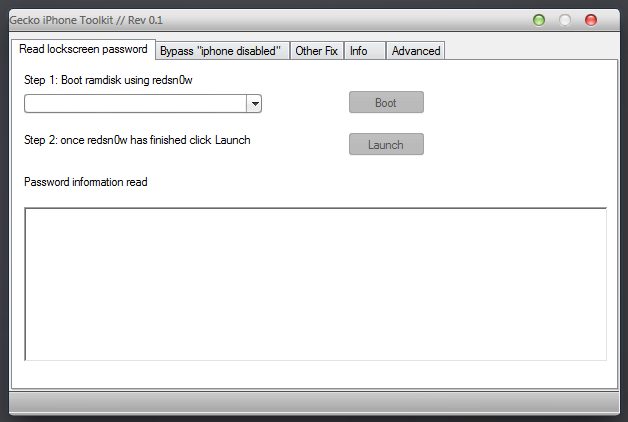
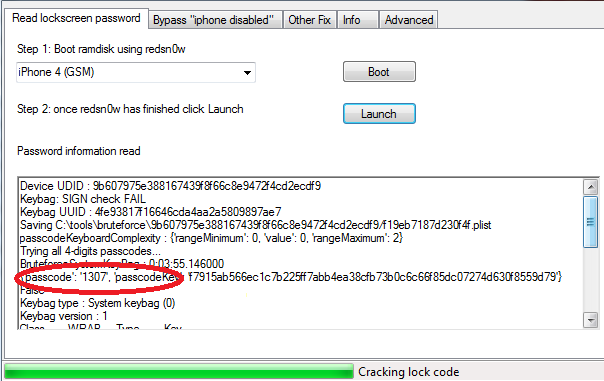
Step 3: Choose your device, in this case, I’m going to use my iPhone 4 as an example. Click the “Boot” button. A new window will popup telling you to choose a firmware. Those process will involve redsn0w, when it’s done, just click the “Launch” button. Wait a few minutes for Gecko to read your passcode. Then it will show it to you in the box right under it.
Check out: 5 Cydia Tweaks to Track a Lost or Stolen iPhone
How to bypass “iPhone disabled”

Besides helping you get your passcode back, this tool also allows you to avoid the “iPhone disable”.
Step 1: Move to the second tab and select your device.
Step 2: Click on the “Bypass” button and put your iPhone into DFU mode.
Step 3: Just wait for it to do the rest.
In the future, if you wish not to disable your iPhone or iPad for entering too many incorrect passcode, try this free jailbreak tweak named No Passcode LockOut. It will let you type wrong Passcode’s as much as you want without needing to wait for hours or reset from iTunes.
That’s it, guys. Just keep in mind that Gecko iPhone Toolkit doesn’t work with iOS 7 devices. Let us know if you have any further questions.
does gecko work on windows 8? I cant seem to get it working on windows 8
Use this ipasswordhelp.com/using-the-gecko-toolkit-with-windows-8
Does this work if the passcode is letters? Or does it only work with numbers?
Passcode with letters too.
does it work for 5c and ios 8.4?
Will it work with a jailbroken ipod 4g that uses a complex passcode?
What’s the firmware you’re using?
Firmware … I so 4.0 something.
I did jailbreak. Disabled.
Ipod 4G.
I got gecko.
Can I solve my problem?
Plz email me.
Is there a Gecko Iphone Toolkit or something similar that will work with an Iphone 6 plus ios 8? I have over a thousand pictures and videos of my 4 yr old, 1 yr old and newborn. I am heartbroken that I can’t get them.
Has anyone responded to you, or have you found a solution? I just bought my iphone so I have the latest IOS (vers. 8.1 I think), but I am told Gecko Iphone Toolkit will not work with it. Have you found a later version or something similar?
Other way around… Just reset your IPhone with Itune… And then you can recover your picture and video with “IPhone Data Recovery” software.
What is that Iphone Data Recovery? i mean, if i didnt do any backups, can i still do this data recovery? and how do u do it??
does this work with ipod 5 with ios8.3?
Not in this version
Is there a later version?
does it work also for the iphone4 cdma or just gsm?
Both
Thankfully this new and awesome program which called Gecko iPhone toolkit will helps you to get back your lost iPhone passcode without needing to restore your whole device and lose your information, you know the rest of the story. So right now we are going to show you a little and easy guide that will helps you to get back your passcode, and the program is only available for Windows users.
Hi, my iPad Air is currently disabled and I need help.
The two computers I have available for this tutorial are a desktop with Windows XP and a Macbook Air. My iPad Air is currently somewhere in iOS 8. Will this process work with either of these computers and an iPad Air with iOS 8?
please, please, PLEASE HELP!!!
Hey Snow, I’m sorry to hear that. Unfortunately, this tool will not work on your iPad Air. The only thing you can do is restore it from iTunes.
Where do we get the firmware?
My iPhone is disabled. I purchased it the day before I left for my daughter’s wedding (two weeks ago, so I guess it is IOS verson 8 something), and there are many photographs and videos and audio recording and text messages on that phone which are no longer accessible to me because my phone has been disabled. Apple is of no assistance to me nor my cell phone carrier. Everyone tells me this cell phone must be hard reset to the factory defaults which will erase all my data. I was not advised in advance that you only have so many trials to put in a password before it locks the phone permanently for all eternity, not even the phone alerted me to this inevitable catastrophe. The irony is because my memory is not as good as it used to be I was just attempting to remember what the password was behind the fingerprint that I was using and I did not even need to put it in in the first place. However once you attempt to put in the password the fingerprint is disabled and you only have so many chances to try your password before the phone is disabled. Strangely one person an AppleCare tells me that there is an update to the OS you can run on the phone which will erase the password and give me access to my data because he says I’m only locked out at the first level and not the final level. He said that I only had to take it to the Apple store and they could plug it in to do this. However after waiting 5 days for an appointment to go there, when I did go they would not even attempt to do it telling me that it is not possible. In the meantime, because I need to hold on to the phone, my 14 trial period has expired. I understand that getting my passcode will not help me because the phone is disabled and no place or opportunity to put it in. Is there any hack that can get me past this nightmare?
Hey Greg, I’m sorry to hear about your problem. Unfortunately, this software won’t work with your iOS 8 device. Yes, the only way to get rid of the phone disabled mode is to hard reset it, which means all data including images and video will be removed.
Is this work for Ipad 2…?????????????????
does it work with ios7.1
does this work with ipads..
Does this work for iPhone 4s??
Phone on disable mode, I know the passkey now since it was written on a note that I had in my desk the whole time but I tried entering wrong passkey too many times, gecko gives me the unsupported device message and redsn0w, I read that gecko is not compatible with ios 6 so I used redsn0w to downgrade but it gets stuck on “…60000 giving up” message can boot 6.0 with redsn0w no problem but not 5.x.
phone is now jailbroken with cylic and ios 6.0 but still disable with connect to iTunes, I have no backups and I don’t want to loose my data. in my computer I have iTunes 9×64 java 7v4 x64 and the latest version of gecko and redsn0w, I had been downloading the ipsw’s from ipsw.me website.
So now you know your passcode but your iPhone is now in disable mode?
Hi
thanks for sharing. my lock button is broke
is it possible to do this process with that button being broke?
I’m afraid not.
I have a disabled iPad 2, and know the passcode. How can I get it out of disabled mode to enter the passcode? Gecko toolkit not working for me. Any hope?
Is archive have password ?
Or need to complete some surveys ?
None of those are required.
Can someone please tell me how I can get this to work on 4S? Phone is disabled and is asking for iTunes
My iphone5 is locked .I forget my password.I don’t restore my phone.Please