Downgrade iOS firmware is becoming a trending topic since the release of OdysseusOTA, which allows jailbroken users to downgrade their iPhone or iPad to older firmware without SHSH blobs. The downside of it though is the lack of supportive iOS versions and devices.
At the moment, OdysseusOTA only has support for iPhone 4s and iPad 2 and will only let you downgrade back to iOS 6.1.3. A new downgrade tool called Beehind is aiming to change that. This downgrade utility is currently in beta, this means there will be more features and more improvements in the future.
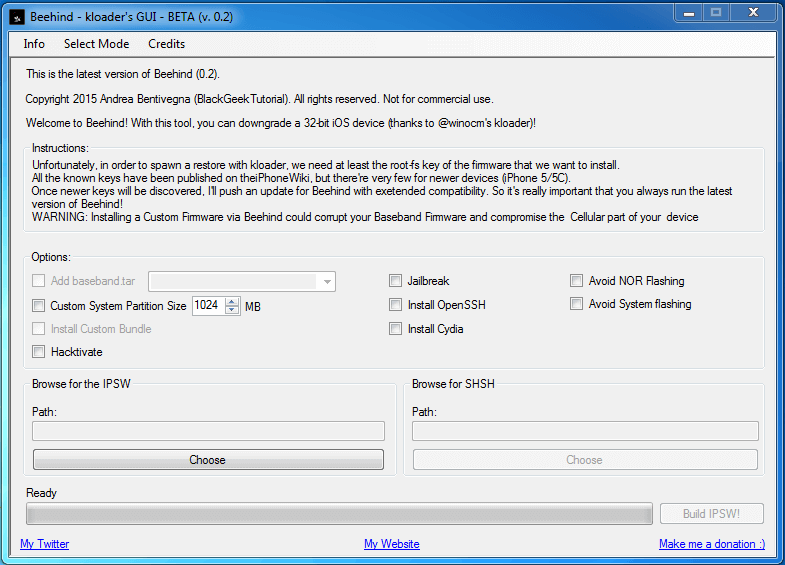
Beehind is a tool developed for Windows, and it requires at least Windows Vista or higher. All iOS devices using 32bit CPUs are supported.
- iPhone 4
- iPhone 4S
- iPhone 5
- iPhone 5C
- iPad 2
- iPad 3
- iPad 4
- iPad Mini 1
- iPod touch 4G
- iPod touch 5G
Beehind Downgrade Features
- Downgrade of ALL 32-bit based devices to ALL iOS versions with known decryption keys.
- Tethered Downgrade (without SHSH) of ALL A4 devices (exploitable with limera1n) to ALL iOS Versions + tethered boot utility
- Fully automated downgrades/restores without the use of iTunes. Beehind will do everything with just one click!
- (maybe) Repartition, Dual Boot and permanent Jailbreak in a different partition (Yes, theorically kloader can make this possible)
As mentioned earlier, Beehind is still in beta, which means there are some more works needed to be done in order for all features to be supported. If do you give this tool a try, be sure to let its developers know if you find any bugs or problems during the downgrade stages.
One thing I can ensure though is that Beehind is easier than OdysseusOTA in term of usability because all you have to do is connect your iOS device and click Build IPSW. Not to indicate that it will be compatible with more devices.
Here is a video showing you how to use Beehind to downgrade without SHSH blobs.
my phone is iphone 5,2 i want to downgrade ios9 to 8 or 7 ro 6 what can i use tool for downgrade my iphone require?
dhasho
Had high hopes to finally downgrade my sluggish old ipad2 with iOS 9.1 to a previous iOS to get back the more responsive iPad I used to have.
However, downgrading with this tool still needs a jailbroken device, so pretty useless for many of us stuck in a new iOS that either want to jailbreak or just want to revert to an older iOS.
This tool seems to have so much potential if it could do it’s job on non-jailbroken devices, however it is probably only useful for a happy few, not for the majority whose reasons to downgrade will be to be able jailbreak.
Thats a very good tool
does it work?
does it work on iphone 5s???
from ios 9.2 to 8.3???
Hi my friend! I want to say that this article is amazing, nice written and include almost all important infos. I’d like to see more posts like this.
First of all thank for your work, it will be better it beehind can support non-jailbroken devices. I have iPhone 4s running 9.2, I want to downgrade it to iOS 6.1.3.
I hope this will be possible as soon as possible.
Is your software can work with icloud lock iphone 4s that has a ios 9.2?
can it be possible to downgrade into ios 6.1.3?
Thanks hope it works….
I am very surprised, that this works!
Note that Beehind’s non-SHSH downgrade method won’t work for an iPad 2 version 2,4 (released in March 2012) because its decryption keys weren’t made public. If you have this model then you’re pretty much SOL unless you have the SHSH blobs, but who actually saved those? Seriously, 99.9% of Apple users wouldn’t have even *heard* of SHSH blobs until they already upgraded and then started desperately surfing for ways to downgrade again.