For those of you who upgraded to iOS 6.1.6 but forgot to save the SHSH file for it, you’ll not be able to untethered jailbreak the device and unlock your iPhone. Therefore, you can only be running on 4.1 or 6.1.6 only. Currently, there is no tools to create an iOS 6.1.6 Custom Firmware. So if you want to update to 6.1.6 then just restore the original firmware using iTunes.
Unlock iPhone 3GS running on iOS 6.1.6
Step 1: Download Rebsnow 0.9.15b3 and unzip it
Step 2: Once the software is launched, click on the “Extras” button
Step 3: Download iOS 6.1.6 from here and click Select IPSW > Choose the firmware > Click Yes (if your device is 3gs oldboot, then click No).
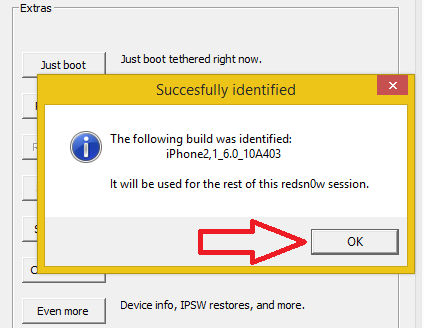
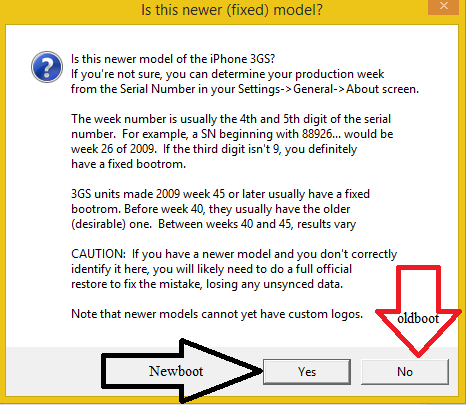
Step 4: Now go back to the main menu, select “Jailbreak” > give a check on install cydia and Install iPad baseband (the purpose is to get Baseband 6.15) > Next.
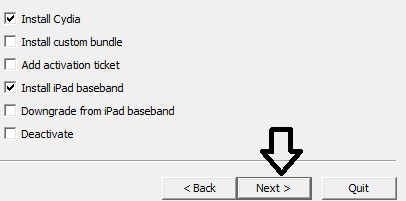
Note: When selecting Install iPad baseband, Redsn0w will ask you a Yes or No question, just select Yes.
Step 5: Turn off the device, put it into DFU mode and wait for the jailbreak process to be completed. If you still not see the Cydia icon on your Springboard, make sure to do a quick “Just boot”.
Step 5: Now go to Cydia and let it reload data and upgrade everything, then go ahead and install a utility called ultrasn0w.
Step 6: Still on the same Redsn0w, choose Extras > Select IPSW > click on the origianal iOS 6.0 firmware > Click No
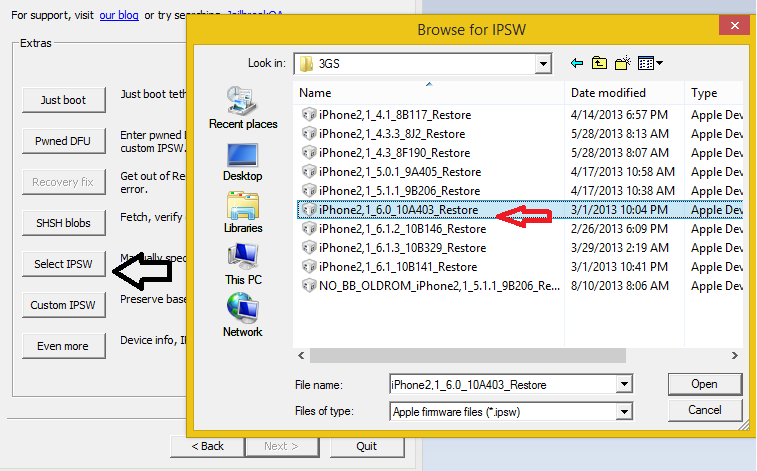
Step 7: Repeat step 4 and 5, then you’re done. You have successfully downgrade from Baseband 6.15 to 5.13. Enjoy!
hi there
my friend upgrade his 3gs at&t phone accidentally ios 6.1.6 and he lost unlock.
than i tried to make what you say on this page. but when jailbreak finishes iphone gives error. on the iphone’s screen i see that
ERROR!
Please reboot the device into normal opration mode, then perform e clean “slide to power off”, then try again.
if i jailbreak without instaling ipad baseband, just install cydia i can do it. but if i want to install ipad baseband it gives error. what can i do? can you help me please
I’m really sorry to hear that. So you’re saying that you can jailbreak a device if you do not choose to install ipad baseband. That’s not a normal situation. Hmm! I think that you may did something wrong. Please try to put the device in DFU mode first. Let me know what happen.
I had similar issues, but got around it by doing the ipad baseband and cydia installs in separate steps rather than both at the same time.
i updated 3gs from 4.1 to 6.1.6…could not get activation key….reason….it was already jailbreak in 4.1…
Thanks for solution. =) Thanks for solution. I updated 3GS from 6.1.3 to 6.1.6 and jailbreaked+unlocked this method. but I left the modem 6.15.
No problem.
Not working! Why? http://i.imgur.com/uGRD4xe.jpg
Please make sure that you follow the steps orderly.
Im having the same problem as BeLa but i swear im following the steps just as it says, anyway around this?
You Have to use IOS 6.0 Not IOS 6.1.6
Quiero desbloquear mi iphone 3Gs tiene la version 6.1.6 baseband 06.15 le hice el jailbraek y le puse ultrasnow y no se desbloqueo que puedo hacer. y trate de downgrade la baseband pero me da error y tengo que restaurar el iphone de nuevo.
Will havr problems in the gps with the ipad baseband? When i unlocked in ios 5.1.1 had to downgrade the bb to 5.16.8 to be able to use gps. But with redsnow on ios 6.1.6 does not support this baseband.
What gps app are you using?
It says it will brick radio wifi etc if I choose yes in step 4. Should I continue anyway? Cause my phone will become useless if its bricked!
My iphone 3gs baseband by default is 6.15. So should I install Ipad baseband even then..??
My friend i have my iphoe 3gs baseband 05.16.08 and serial 88144Txxxxx, so is dangerous apply the ipad baseband. What can i do? Please help me!!!
Error when do pass number 7:
-the connected device doesn´t support untethered options.
What do you mean?
if you are having problems, for step 3, DO NOT USE firmware OS 6.16. instead select firmware ISPW 6.0 restore.( you will have to download this firmware from before.) then follow the rest of the steps
worked for me, 3gs new bootrom before 13th week 2011 device
hello ihacks blogger’s
first I tolled to my problem I got a iphone 3gs ios 5.1.1 locked than jailbreak its with 6.0.1 ios but my iphone was activated but locked sim card than I put the ios 6.1.6 restore file on iTunes software update folder and restore it with iTunes but I still got inactivated with sim lock problem finally I jailbreak only with cydia after that process phone was activate but still sim locked than I found your ans
I have done steps 1 with os 6.0 and other as you mention but I’m facing a new problems iphone go’s to inactivated condition and reboots problem in the and I have jailbreak iphine just with cydia now iphone is activated but searching the network please tell me what can I do plz reply me Id *deleted for privacy purposes*
and the cydia icon is not appearing I tried just boot lot of time but redsn0w 0.9.15b3 got error “error with SHSH blobs!
he is using iOS 6.0