
When you successfully jailbreak your device you will then get an app called Cydia. This is where you can insstall cydia tweaks, themes, apps, hacks, etc so that you can customize your iPhone and make it looks better with more features. But you need a little bit more than that. The default sources you get in Cydia is not enough. You need to add extra sources so that you can get everything out of Cydia. Here we have 5 best cydia sources in 2013 for your ios devices. Let’s check them out.
1. http://repo.heaveniphone.com/
2. http://rpetri.ch/repo/
3. http://ihackstore.com/repo/
4. http://sinfuliphonerepo.com
5. http://repo.insanelyi.com/
All of the 5 sources listed above are the best one of 2013. Most of them are rally popular and has been used by millions of people who jailbroke their devices. Now you know the top 5 one, read the instructions below to add them to your Cydia.
Step 1: Go to your Cydia app > look for the Manage tab and tap on it.
Step 2: Choose Sources (the second options) and tap on “Edit” on the top right hand corner
Step 3: Choose “Add” on the top left hand corner and enter your sources url. Here I will use heaveniphone cydia as an example.
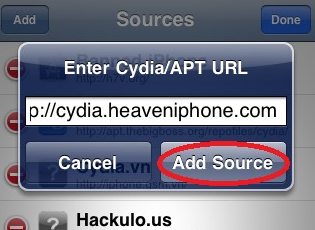
Step 4: Finally tap on the “Add Source” button just like the image above. Wait a few seconds for Cydia to install your source. Done and Enjoy!
Comments
Related posts:
- How to install paid apps/tweaks on cydia for free with Cydia HeaveniPhone
- How to install Cydia for Android with Cydia Substrate 2013
- How to make your own Cydia Repo for free with SourceMaker
- Top 10 cydia tweaks you must have for jailbroken iOS 7
- Download Velox v1.0.1-1 for iPhone, iPod touch, and iPad for free [Cydia Tweak]

Comments on this entry are closed.