
Want the Look of IOS 7, But your device isn’t supported, Or you don’t want to wait for the Final release of the OS…. Well, Now you can get the look, and the features of IOS 7 NOW!! And here’s how:
(Note; You must be using a jailbroken device)
Cydia Sources you will need:
http://apt.ModMyi.com/
http://iPHONiX.myrepospace.com/
http://rpetri.ch/repo/
The Default Big Boss Repo
Packages you will need:
iOS 7 Theme (Requires Winterboard)
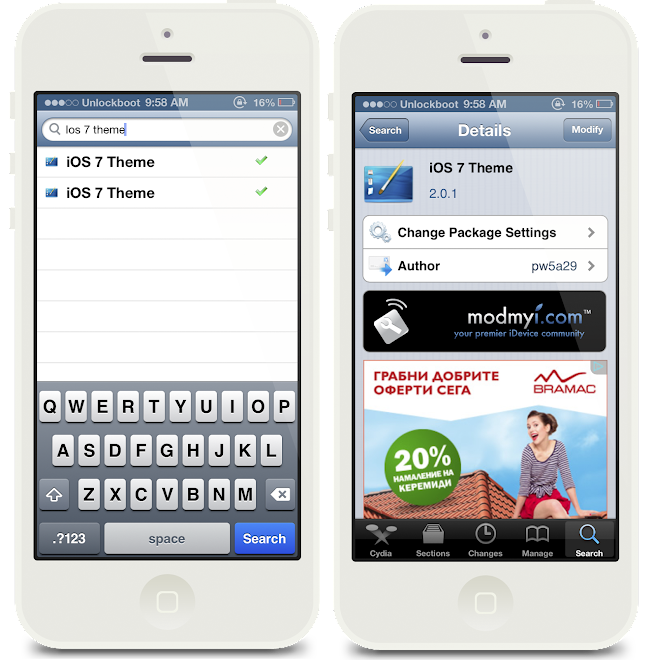
IOS 7 Theme in Cydia
iOS 7 Theme by Philip Wong (pw5a29) is the most Overall Complete IOS 7 Theme out there. It provides Support for:
- App Icons
- Signal Bars
- Wallpapers
- Batteries
- Revamps UI inside of Apps
- And much more
You can download this theme from the ModMyi Repo at the top of the page
(Enable all features you would like inside Winterboard)
iOS 7 animated lockscreen (Requires Winterboard)
Before: Left, After: Right
If you’re just looking for the iOS 7′s new Lock screen then check out the iOS 7 animated lockscreen theme also in the ModMyi Repo. This theme Creates a more open feeling lockscreen interface and also provides a moving iOS 7 Background!
Parallax Effect
iOS 7′s 3D Parallax effect makes the “position or direction of an object appear different when viewed from different angles”. DeepEnd by Ryan Petrich, developer of popular apps such as Activator, allows you to check out the 3D-effect on your jailbroken iOS device right now.
This Tweak is available on the rpetri.ch Repo at the top of the page
IOS 7 Control Center/ Notification Center
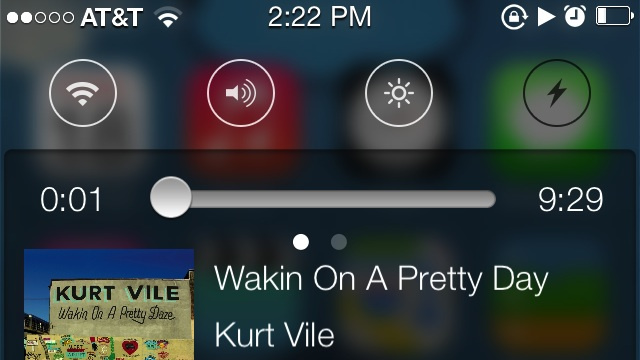
Notification Center
The new version of Notification Center is a great improvement to how it used to be in earlier iOS versions. Now, with the addition of them In IOS 7. Apple seems to be “evolving”.
To get these Notification center toggles you need to:
- Download and install NCSettings from Cydia.
- Enable NCSettings by turning it on in Settings > Notifications.
- Download and install BlurriedNCBackground from Cydia.
- Grab the iOS 7 Control Toggles theme for Winterboard. Enable it in both Winterboard (iOS 7 Control Toggles BG) and NC Settings (Settings > NC Settings > Theme > iOS 7 Control Toggles).
- If you want to add the Control Center-style music controls, you can add in NCMusicGestures. It’s not as good looking as the iOS 7 music controls, but it’s functionally the same.
That’s it, now your Notification Center works almost identically to Control Center in iOS 7. With a few more tweaks, you can get almost the exact same function from iOS 7 On your iOS 6 NC!
Now you have the look Of iOS 7, BUT You may have a lower RAM device that might lag if you decide to have all these features installled at once.. Heres a way i found to decrease the lag and free up file space after installing these themes!
1. Download iFile from Cydia if you don’t have it already
2. Enable all Features of the iOS 7 Theme that you want, (take note of the ones you don’t)
3. In iFile Press the back arrow until you cannot anymore (you’re not in any specific file directory)
4. Scroll all the way up to applications (Top of the screen)
5. Once inside “Applications”You are wanting to press the back arrow, this will bring you to Var/Stash (where the themes are located)
6. Click “Themes.onsoBO” (At least that’s what it says on my device, if not the same for you, click on each of the theme files until you find the one filled with Winterboard Themes)
7.Delete all themes you are not using then empty your iFile Trash!
And there you go! lag = Gone!
Hope you enjoyed this post, If there needs to be any modifications, tell me! (like any other features i should add) 
Comments
Related posts:
- Aplo: Best iOS 6 Theme for your iPhone
- Luna is now live in Cydia, Download Luna for iPhone, iPod touch, and iPad
- How to install paid apps/tweaks on cydia for free with Cydia HeaveniPhone
- Download Mavericks Mini Theme for your iPhone
- How to install themes on iPhone 5 without jailbreak using Black Orbs

Comments on this entry are closed.