


Windows RT is a special version of Windows 8 for tablets, and then manually rotate the screen mode to help users more flexibility in operation but cause annoyance, you can reduce this annoyance by disabling the automatic screen rotation.
Use the Brightness bar
When You open the Charm bar you will see the Brightness option to customize the brightness of the screen, but on some devices it also includes functions to disable auto screen rotation.
Use shortcuts
If you are using a device with a keyboard attached, you simply can use WIN + O to convert mode on / off the automatic screen rotation. Obviously this will not work on a tablet unless it has a keyboard attached, and we‘re not sure if it’s working on all devices.
Using the GUI
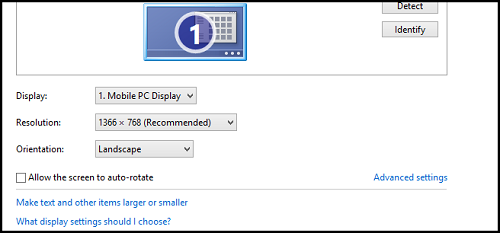
To customize Screen resolution section, you will see the option Allow the screen to auto-rotate, uncheck to disable this feature.
Using the Tablet Button
Some tablets have a button that allows you to quickly disable the auto-rotate function. You will need to check the user manual attached to your tablet includes a button or not.
Become a VIP Member
Why sign-up for a ViP account?
1. Download everything for free
2. Fast and Better support
3. No additional payment after this
P/S; If you find something wrong, please send an email to [email protected]