Android devices do not have built-in notes application. Right now, Evernote is considered the most powerful notes application on Android, but in addition there are still many other applications cheaper, easier to use. Here, we would like to introduce four best notes app for Android.
1. Evernote
Evernote is the most popular notes application for the Android platform. Evernote lets you take notes, to-do list, reminder voice recorder, attach a photo or video notes. Evernote is an application that enables data synchronization. You can create notes on a variety of devices installed Evernote such as computers, phones, web browsers, etc.. When using the device with Evernote installed, you can view notes created on your computer. After you create a note, you can share on Facebook, Twitter or email.
However, Evernote ask you to register to use the service. Also, you have to constantly connect to the Internet to access the notes. If you want offline access, users have to pay extra.
2. Catch Notes
Catch Notes is probably the second common application notes after Evernote. If you do not want to pay for Evernote, this will be a brilliant alternative. Although there are slightly fewer features than Evernote. Catch Notes has a simple interface and is quite flexible. Catch Notes is a widget for quick access. You can also create notes with photos.
3. ColorNote
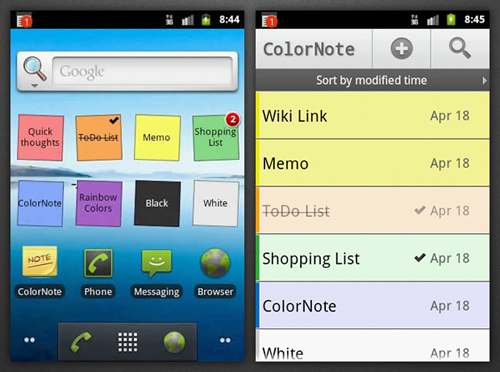
ColorNote is built on the idea to help you distinguish the notes based on colors. ColorNote will create sticky notes on the home screen with vivid colors. Although the application is free, ColorNote also supports features such as online backup sync, allows sync notes between phone and tablet; reminder on the status bar, search notes, divided Share notes via SMS, email, Twitter ..
4. Gnotes
Gnotes is simple and completely free. You do not need to pay any fees to view and edit notes in offline mode. Gnotes synchronized with your Gmail account, so you don’t have never worry about losing important notes. The application has a simple interface and very easy to use. You can use drag and drop to move or delete notes, take notes outside the home screen ..
Gnotes offers many options: audio notes, handwritten notes, attach pictures, sound. You can sort the notes into a folder (directory).