
How to save SHSH blobs for iOS 6.1.3
Apple has officially released iOS 6.1.3 to fixed the security issues and improved map in Japan. I would like to guide you through some simple steps on how to you to save SHSH blobs for iOS 6.1.3 using iFaith v1.5.5
Step 1: Download iFaith here
Step 2: Open iFaith up and click OK.
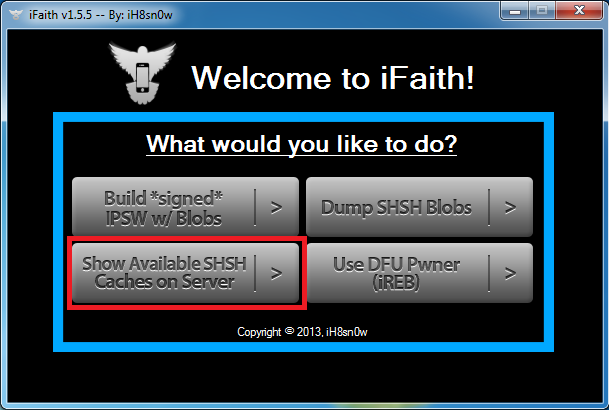
Step 3: Then click the on “Show Available SHSH | Caches on Server” button and connect your device that’s running iOS 6.1.3 to the computer.
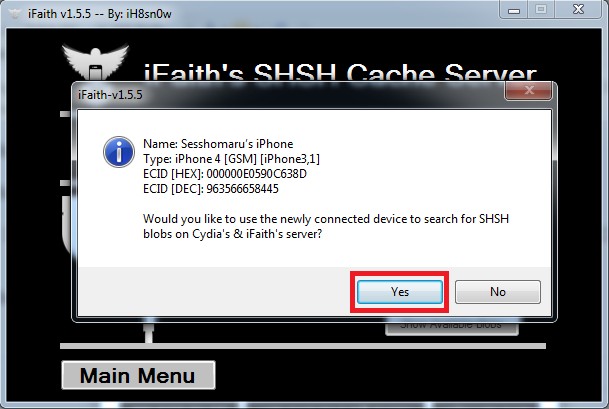
Step 4: Now you will see a popup where it will ask you if you would like to use newly connected devices to search for SHSH blobs……Just click Yes
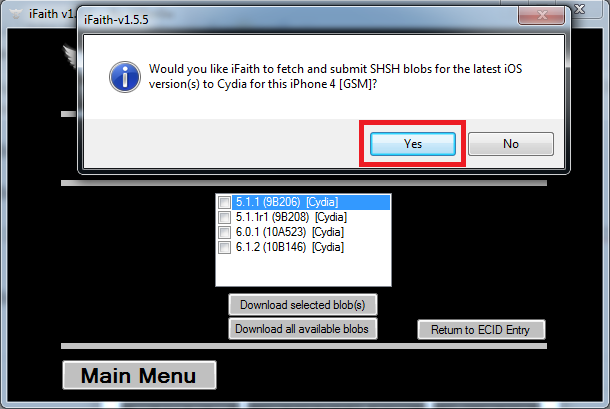
Step 5: After clicking YES iFaith will load and will popup another window (basically it will asks if you want to save shsh latest version?) click YES.
Step 6: When it finish saving your SHSH blobs for iOS 6.1.3 iFaith will tell you where to find that SHSH. Just follow the directory that it give you.
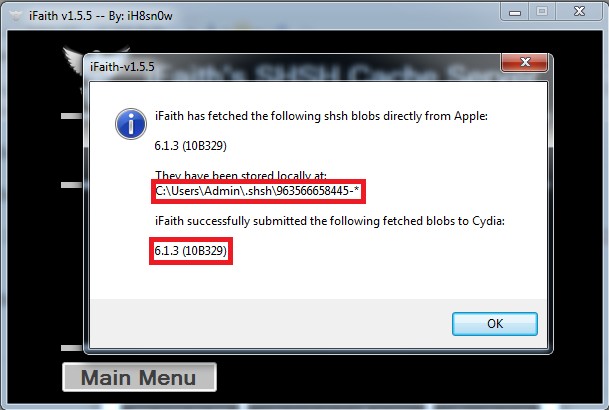
Step 7: That’s it. You has successfully save your SHSH blobs for iOS 6.1.3. Enjoy!
Most wanted:
shsh blobs for ios 6 1 3, shsh blobs 6 1 3, shsh blobs, how to save shsh blobs 6 1 3, download shsh blobs for ios 6 1 3, 6 1 3 shsh blobs, download shsh blobs for ios 6 1 3 iphone 4Related posts:
- How to save SHSH blobs for iOS 6.1 using TinyUmbrella v6.10.02
- Notcom updated TinyUmbrella, now support save iOS 6.1.2 SHSH Blobs
- iFaith v1.5.6 is out with support for dumping iOS 5.2.1/6.1.3 blobs on 3GS/A4 devices
- Download TinyUmbrella v6.10.03, save SHSH on iPhone 4S running iOS 6.1.1
- iH8sn0w will release iFaith v1.5: support A5, A5X, iPhone 5 and iPad Mini

Comments on this entry are closed.