
Nearly every component of Windows 8 can be customized to satisfies the user‘s needs and preferences. However, some of the settings are hidden inside the registry. Here are the steps to change the screen display Sign-in (login) color in Windows 8.
Note: This tutorials only changes the color of the screen when you select the user account to log in, it do not change the color of the screen when you are asked to enter the password (password).
Step 1: Press the keys “Win + R” to open the Run box, type in “regedit“ and press Enter.
Step 2: When the Registry Editor is opened, find the following path: HKEY_LOCAL_MACHINE SOFTWARE Microsoft Windows CurrentVersion Explorer Accent
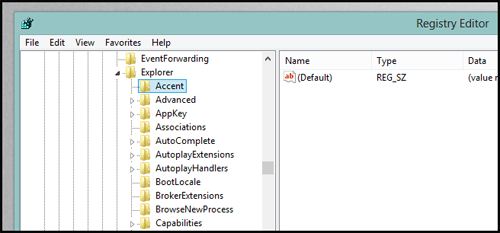
Step 3: In the right panel, create a new DWORD (32-Bit) by pressing the right mouse button, select DWORD (32-Bit) and named it DefaultColorSet.
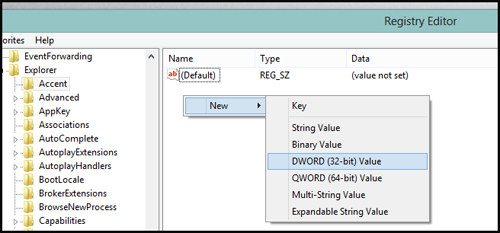
Step 4: Double click on DefaultColorSet to appear as table below:
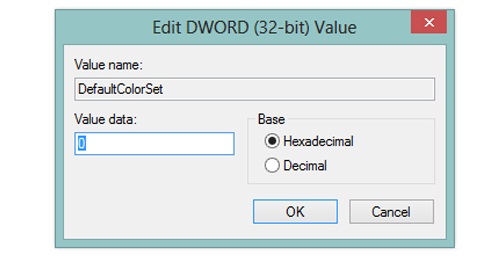
Step 5: Now change the Base type to Decimal and assign it a value between 0 and 24. Here’s a list of some common colors:
Below is a list of some common colors:
11 - Dark blue
12 - Green Light
14 - Red
16 - Purple
17 - Dark Blue
18 - Blue
21 - Gold
22 - Red
23 - Grey
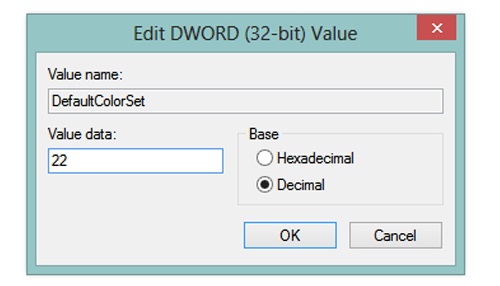
Step 6: Click “OK” and everything is completed. Goodluck. Source: Howtogeek


Comments on this entry are closed.